The "Great Firewall" Survival Guide: Essential Apps for Traveling in China
Visiting China is an incredible adventure, blending ancient history with futuristic skylines. However, it also presents a unique digital challenge: The Great Firewall.
If you land in Beijing or Shanghai expecting to use Google Maps to find your hotel, update your Instagram story, or check your Gmail, you are in for a surprise. They won't work.
But don’t panic. With a little preparation and the right toolkit, you can navigate China like a local. Here is your ultimate guide on what is blocked, how to bypass it, and the essential Chinese "Super Apps" you need to download before you board your flight.
🚫 The "Blocked" List: What Won't Work
The Great Firewall blocks most Western internet services. As of late 2025, you generally cannot access the following without a workaround:
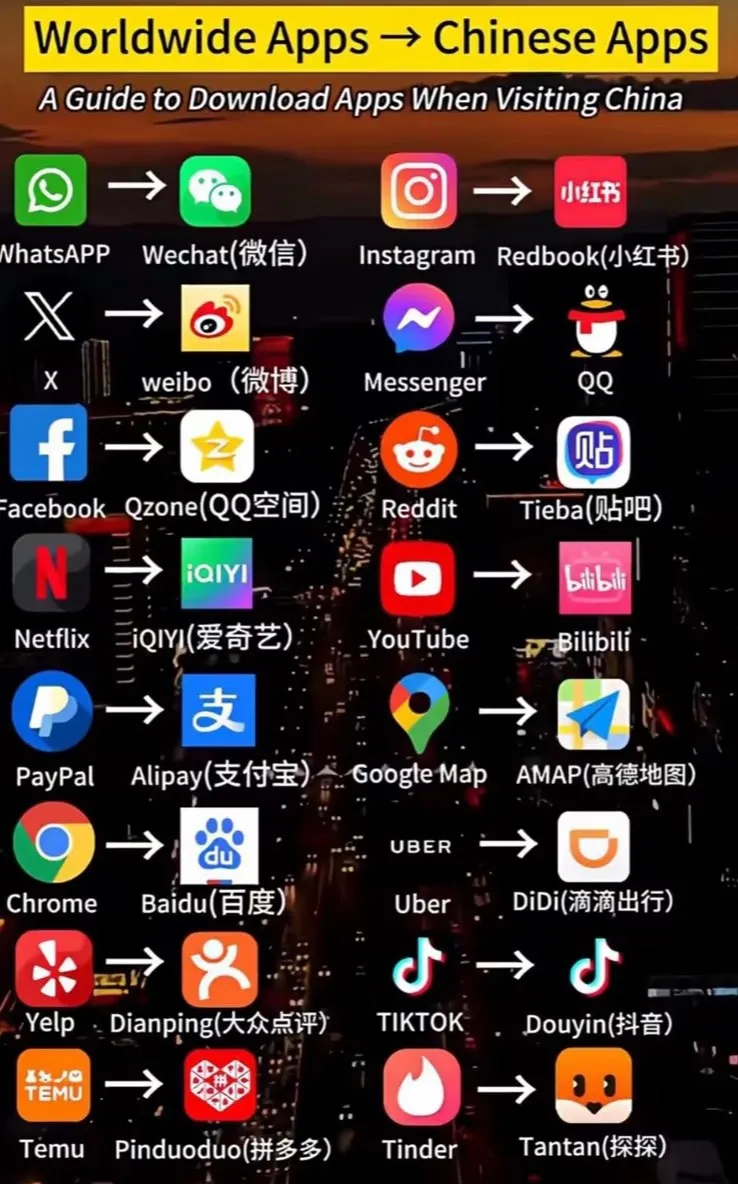
- The Google Ecosystem: Google Search, Gmail, Google Maps, Google Drive, and YouTube.
- Social Media: Facebook, Instagram, X (Twitter), TikTok (the international version), and Snapchat.
- Messaging: WhatsApp, Telegram, Signal, and LINE.
- Streaming/Content: Netflix, Spotify (mostly limited), and Wikipedia (varies, but often unreliable).
Note for iPhone Users: iMessage and FaceTime generally do work in China, making them a reliable way to contact friends and family back home.
🔓 The Workarounds: Staying Connected
You have two main options to access your favorite blocked apps while in China.
1. Roaming / International eSIM (The Easiest Way)
If you use an international roaming plan (like T-Mobile in the US) or purchase a travel eSIM (like Airalo or Holafly), your data traffic is usually routed through your home country. This often allows you to bypass the firewall automatically without extra software.
2. Install a VPN (Virtual Private Network)
If you plan to use local Wi-Fi, you must have a VPN.
- Crucial Rule: You must download and install your VPN before you arrive in China. VPN websites are blocked inside the country, so you won't be able to download them once you land.
- Recommended: Astrill and ExpressVPN are historically reliable, but performance changes frequently. Check Reddit’s r/ChinaTravel for the latest recommendations.
✅ The "Must-Haves": Apps You Need to Download
To survive in China, you need to join the local digital ecosystem. These apps are the lifeline of daily life.
1. Payment: Alipay (Zhifubao) or WeChat Pay
Cash is rarely used in China. From high-end hotels to street-side dumpling vendors, everyone uses mobile pay.
- The Good News: Both Alipay and WeChat Pay now support linking international credit cards (Visa/Mastercard).
- Action: Download Alipay first. It has a better English interface and a built-in "Tour Card" feature. Verify your identity and link your card before you fly.
2. Navigation: Apple Maps or Amap (Gaode)
- For iPhone Users: Apple Maps works surprisingly well in China. It uses data from AutoNavi and is one of the few reliable map apps with an English interface.
- For Android/Power Users: Amap (Gaode Ditu) is the gold standard. It is entirely in Chinese, but it is accurate. You can usually paste the Chinese address of your hotel into it to show a taxi driver.
3. Ride-Hailing: DiDi (The "Uber" of China)
Uber does not exist in China. Instead, you will use DiDi.
- Download the "DiDi - Greater China" app. It features a full English interface and allows you to pay via the credit card linked in the app (or via Alipay).
- Pro Tip: It has a built-in chat translation feature, so you can communicate with your driver in English, and they will see it in Chinese.
4. Travel & Trains: Trip.com
For booking high-speed trains, flights, and hotels, Trip.com is essential. It is the international version of Ctrip. The interface is in native English, customer support is available 24/7, and it accepts foreign currencies.
5. Translation: DeepL or Baidu Translate
Since Google Translate requires a VPN to work online (though offline packs help), having a backup is smart.
- DeepL: Offers superior nuance for text translation.
- Baidu Translate: Excellent for image translation (scanning menus or street signs).
📝 Your Pre-Flight Checklist
- [ ] Download Alipay and link your Visa/Mastercard.
- [ ] Purchase an eSIM or check your roaming plan.
- [ ] Install a VPN (and test it) if you plan on using hotel Wi-Fi.
- [ ] Download "DiDi" for taxis.
- [ ] Screenshot your hotel address in Chinese characters (Mandarin) to show drivers if technology fails.
China is a cashless, digital-first society. Once you have these apps set up, you’ll find that traveling there is surprisingly convenient and efficient. Enjoy your trip!
Technical Implementation Advice (For You, the Developer)
Since you are building the website, here are a few tips to make this article perform better:
- Internal Linking: If you have pages for specific cities (e.g., "Beijing Travel Guide"), link to them from the "Navigation" section.
- App Icons: Visually display the icons of the apps (Alipay, WeChat, DiDi). This helps users recognize them in the App Store, as there are often copycats.
- Download Buttons: Include direct buttons to the Apple App Store and Google Play Store for the correct versions of these apps (especially DiDi, which has different versions for different regions).
- "Last Updated" Date: The GFW changes fast. Put a prominent "Last Updated: [Current Month] 2025" at the top. Google favors content that is seen as fresh in this niche.
- QR Codes: For WeChat and Alipay, consider adding a visual guide (screenshots) on how to add a foreign credit card, as this is the #1 pain point for users.