Why 3HK is the Best Secret for China Travel
If you are planning a trip to China, you likely already know the two biggest headaches:
- The Great Firewall: Standard Google, WhatsApp, Instagram, and YouTube services are blocked.
- The "Number" Problem: You need a phone number to register for essential Chinese apps like Alipay, WeChat, and DiDi (Uber equivalent).
While many travelers buy expensive VPNs or limited travel eSIMs (like Airalo), there is a superior "local" solution: The 3HK (Three Hong Kong) DIY Prepaid eSIM.
Why Choose 3HK?
- Bypass the Firewall Naturally: Because 3HK is a Hong Kong carrier, your internet traffic routes through Hong Kong. This means Google, Instagram, Facebook, and WhatsApp work instantly without needing a VPN.
- Super Affordable: Data plans are significantly cheaper than most western travel eSIMs (e.g., ~HK$268 for 45GB/365 days valid in Greater China).
- Real Phone Number: You get a Hong Kong number (+852) for free, and you can add a Mainland China number (+86) to receive SMS verification codes.
Step-by-Step Guide: How to Apply & Activate
Step 1: Purchase the 3HK DIY eSIM
You do not need to be in Hong Kong to buy this. You can do it from your couch before your trip.
- Visit the official 3HK DIY Prepaid Website (or download the "My3" App).
- Select "Store" or "Prepaid SIM".
- Choose the "DIY Prepaid eSIM".
Important: You don't need to buy a Data Plan immediately, but buying a "Travel Data" package for "Greater China" (Mainland, HK, Macau) is recommended.
- Recommendation: Look for the 30-Day or 365-Day Pass for Greater China.
- Complete the payment (Credit Card, Apple Pay, or Alipay HK).
- You will receive a confirmation email with a QR Code.
Step 2: Install and Activate the eSIM
- iOS: Go to
Settings>Cellular>Add eSIM>Use QR Code. - Android: Go to
Settings>Network & Internet>SIMs>Add more>Download a SIM instead. - Scan the QR code from your email.
- Note: The eSIM will activate once it connects to a supported network. You can install this before you fly.
Step 3: Real-Name Registration (Required!)
Hong Kong law requires all SIM cards to be registered with a real ID. You cannot use the SIM without this step.
- Keep your eSIM turned ON (even if you are in your home country, it needs to receive a signal/SMS).
You should receive an SMS with a link to the Real-Name Registration (RNR) page.
- If not, verify on the 3HK website under "Real-name Registration" using your mobile number/ICCID.
- Select "Individual User".
- For Foreigners: Select "Passport" as your document type.
- Scan your passport verify your details.
- Once approved (usually instant or within minutes), your Hong Kong number is fully active.
Step 4: Getting a Mainland China Number (The "Add-On")
⚠️ Vital for Apps: Having a +86 Mainland number allows you to register for restaurant queuing apps, order delivery (Meituan), and use ride-hailing services more easily.
- Open the My3 App or log in to the 3HK website.
- Navigate to "Value Added Services" or "Add-ons".
Look for "Mainland China Number Service".
- Cost: Approximately HK$19 / month.
- Purchase the subscription.
Second Registration: You may be asked to perform a separate Real-Name Registration for this Mainland number.
- Note: Strictly follow the instructions. While a Passport is generally accepted for the HK SIM, regulations for the Mainland add-on can sometimes be stricter. Ensure your passport photo is clear.
Once active, you will receive a random +86 mobile number.
- Usage: You can view incoming SMS messages directly in your phone’s message app (or sometimes inside the My3 app). You cannot make outgoing calls with this specific add-on usually, but receiving SMS is unlimited.
Pro-Tips for Tourists
1. Top-Up Balance First
The 3HK website/app can be tricky with foreign credit cards sometimes. It is often easier to Top Up your wallet balance (e.g., add HK$200) first, and then use that balance to buy data packages or the number add-on.
2. Check Your APN
If your data isn't working upon arrival in China:
- Go to your cellular settings.
- Ensure Data Roaming is toggled ON for the 3HK eSIM.
- Check the APN (Access Point Name) settings. It should usually be
mobile.three.com.hkoripc.three.com.hk.
3. Keep Your Number Alive
This eSIM is prepaid. If you want to keep your Chinese number for a future trip, ensure you have enough balance in the account for the HK$19/month deduction.
Summary: Is this right for you?
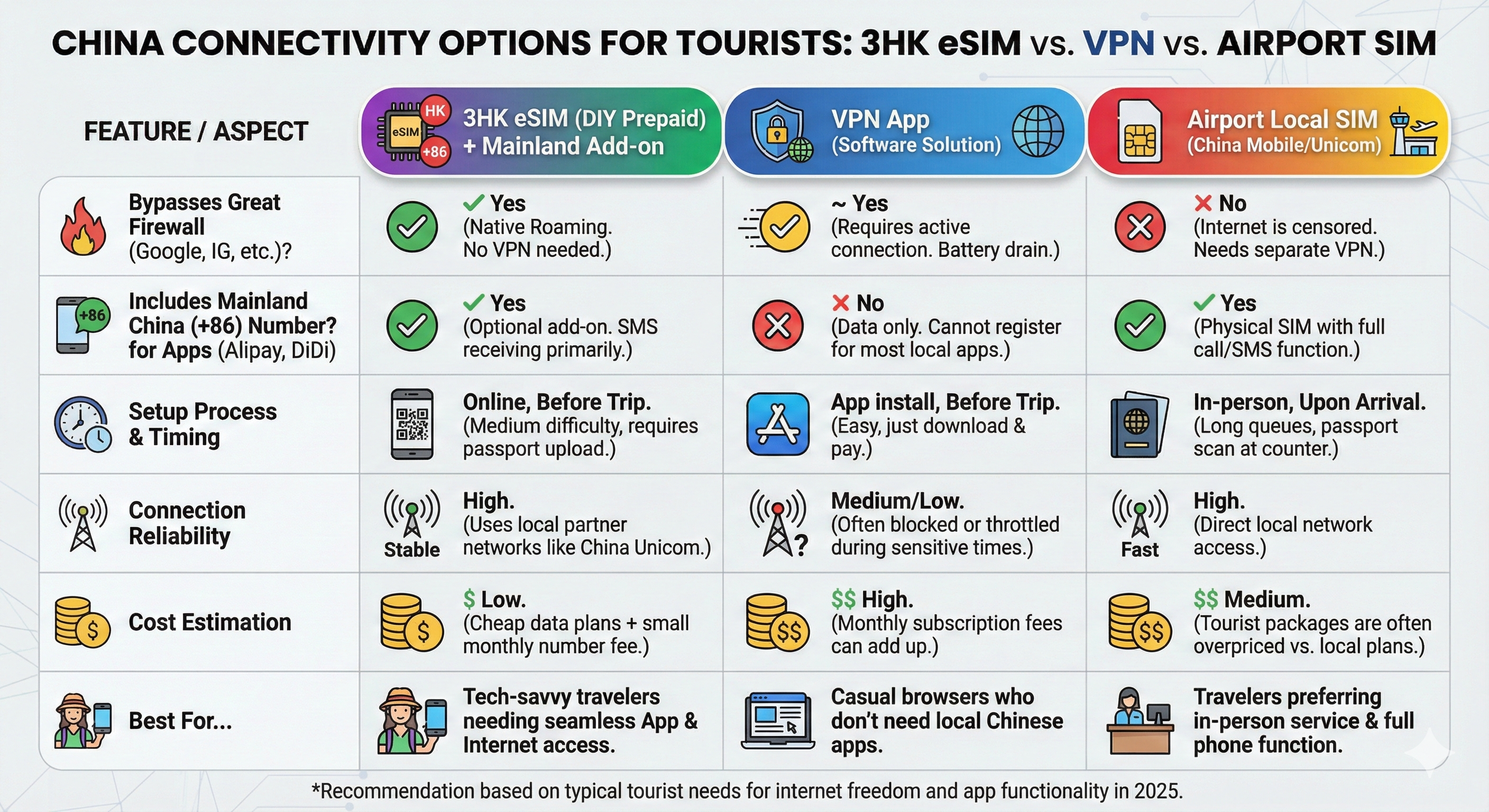
| Feature | 3HK eSIM | Traditional VPN |
|---|---|---|
| Setup Difficulty | Medium (Requires Registration) | Easy (Just an App) |
| Reliability | High (Native Roaming) | Low (VPNs often get blocked) |
| Battery Life | Normal | Drains Battery (VPN runs in background) |
| Local Number | Yes (+852 & +86) | No |
| Price | $ (Very Cheap) | $$ (Expensive monthly subs) |
FAQ
Q: Can I use TikTok with this eSIM?
A: International TikTok might still block you based on the SIM card region code, but most Western apps (Instagram, YouTube, Gmail) work perfectly because the internet traffic looks like it is coming from Hong Kong.
Q: Do I need to be in Hong Kong to activate it?
A: No. You can install and register it from your home country. It will simply roam on your local network (e.g., AT&T or Vodafone) to receive the initial activation SMS.
Q: Does the Mainland Number support voice calls?
A: The standard HK$19/month add-on is primarily for SMS verification. Incoming calls may work but are expensive. Use WeChat Audio or FaceTime for calls instead.